
Pure contains information on research publications, activities and impact. Although publications can be imported from a range of external sources, impact, activities, prizes and media attention should be added manually to Pure.
Pure also contains information synchronised from other University systems e.g., applications, awards, HR data and postgraduate student supervision.
Information from Pure is made available on the Public Research Portal . Content displayed on the portal is updated, added and edited through Pure, updating the visibility settings in Pure allows you to control what is publicly available on the portal.
Follow some simple steps to keep Pure up to date
- Check your Pure account to make sure it’s accurate.
- Tell paperaccepted@abdn.ac.uk about any new or missing publications.
- Connect your ORCiD to Pure for faster discovery of published works.
Check your Pure account to make sure it’s accurate
- Research Outputs and Activities
-
Research outputs (publications) and research activities (memberships, conference participation, public engagement or engagement with Industry, Peer review activity, etc.) should be recorded in Pure to reflect academic activity undertaken while employed at the University of Aberdeen. Publications produced prior to joining the University of Aberdeen can also be showcased through Pure to provide a full academic profile
Academic staff should make sure that Pure is up to date and is reflective of their publications, open research, research activities and other esteem factors.
Individuals can check what data is held in Pure via their overview screen or by using the cv style report. If a recent publication is missing from Pure please email paperaccepted@abdn.ac.uk with the details of the output(s), including links to the publication online. If the publication is a journal article please also include and a copy of the author accepted manuscript.
Information on publications and activities can also be reported from Pure; if you would like a report of this information please contact researchreporting@abdn.ac.uk
- Research Supervision
-
Information on postgraduate research supervision is available in Pure, with details of Research Postgraduates synchronised from the student records system. If you are supervising an undergraduate student or a postgraduate student not undertaking a research track this will not be visible through Pure.
Academics can view their supervision information on their personal overview screen in Pure
If any details are incorrect or missing please notify the Pure team by emailing pure-feedback@abdn.ac.uk
Academics Student supervision is shown for each year of study, so some duplication will be seen when viewing former students.
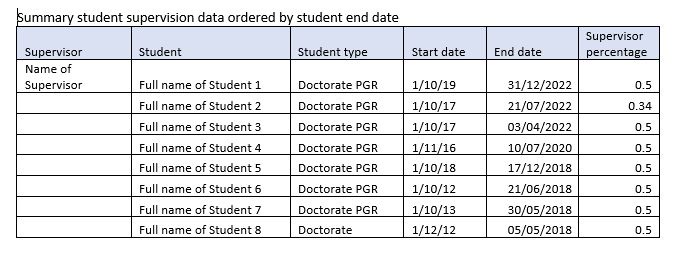
Summary data for student supervision can be reported out of Pure. An example report of student supervision is shown below.
- Research Funding: Internal awards
-
Some Internal funding awards are not currently recorded in Worktribe to avoid duplication in financial accounting. Internal funding awards which are not recorded in Worktribe, including pump prime funding and other internal funding streams, can be recorded in Pure.
Academic staff should check Pure to make sure that internal funding has been recorded and is up to date.
If any Internal funding is missing from your record, please contact pure-feedback@abdn.ac.uk and provide the following information:
- Project Title
- ID (funder reference / budget codes provided by the university)
- first name, last name and internal or external affiliation for all researchers listed on the award
- Funding body name or Internal award stream
- Award value
- Award date
- Start date and end date of the project
You can check your current project information in Pure using the personal overview screen.
Information on your projects can be reported from Pure; if you would like a report of this information please contact researchreporting@abdn.ac.uk
- Research Applications and Awards: External Funding
-
Applications & Awards are recorded in Worktribe for all externally funded grants where funding is allocated to the University of Aberdeen. Data from Worktribe is sent to Pure so that research funding can be linked with publications and other research outputs.
Academic staff should make sure that applications and awards are up to date. Your Research Development Executive, and the Pre and Post award teams can help if you have any queries about the status of an award.
Academics can view their applications and awards by accessing Worktribe or by viewing the synchronised data in Pure .
Information on applications and awards can reported from Pure; if you would like a report of this information please contact researchreporting@abdn.ac.uk
Tell paperaccepted@abdn.ac.uk about any new or missing publications.
Deposit your recently accepted research publications in Pure and AURA . When you have a paper accepted for publication email paperaccepted@abdn.ac.uk with
- a copy of the confirmation of acceptance and
- a copy of the accepted manuscript.
Library staff will upload your paper to Pure in compliance with the publisher self-archiving, funder and REF policies.
Find out more about our publication deposit and open research services on our library pages
Connect ORCiD to Pure for faster discovery of published works
ORCID stands for Open Researcher and Contributor ID and is a unique identifier that researchers can adopt.
ORCID is a way for researchers to eliminate name ambiguity, and accurately connect authors to their work throughout their career.
- What is ORCiD?
-
ORCiD is a non-profit organization, which provides a fully open and interoperable identifier to reliably connect researchers with their research contributions.
The Open Researcher and Contributor ID or ORCiD is a 16-digit identifier that researchers can register and use for free, it:
- Connects individuals and their professional contributions across disciplines, organizations, and time.
- Enables recognition of all types of research contributions and innovation.
-
Helps research institutions, funders, publishers, and other organizations better track and support research work.
- Why Use ORCID?
-
How ORCID Works
- It's a registry of unique persistent identifiers for researchers.
- It's a hub that connects researchers with their professional activities and contributions.
- It's a global community that enables researchers to share their data with other individuals, organizations, and systems.
Reasons to have an ORCID
Ensure your work is recognized.
- Quickly and unambiguously identify and attribute your work.
- Distinguish yourself from every other contributor, even those who share your name.
- Gain recognition of your peer reviewing activities.
Maintain all your key information in one place.
- ORCID is supported and increasingly required by major funders, publishers, societies, and research organizations.
- Save yourself time when applying for funding, jobs, and submitting research to online publication platforms.
- Increase discoverability of your research.
Quick and easy to register and use.
- ORCID is not for profit: your data is not tracked or sold.
- Own and control your own record: choose which information is private and which is shared.
- It takes seconds to associate your ORCID ID with an account
- Add ORCID to Pure
-
Find out how to Connect your ORCiD account to Pure on our SharePoint page
- Integrate ORCID to Researchfish
-
Integration between Pure, ORCID and Researchfish means that information can flow from Pure to ORCID and on to Researchfish. Outputs in your ORCID profile will be sent to Researchfish , and can then be added to your grant(s).
Connect ORCID to Researchfish in just three steps
- Log-in to your Researchfish account.
- Expand the ORCID tab and click the "Create or Connect your ORCID iD" link.

- Sign-in to your ORCID account, or register for an account.
The two accounts are now linked. Outputs added to your ORCID profile will be available for selection in Researchfish. In addition, grants from your Researchfish profile will be added to your ORCID record.
Public Research Portal and Aberdeen University Research Archive (AURA)
The Research Portal displays research outputs that have been entered in Pure, the University's research information system. The research portal links the AURA where open access full text publications are available to read.
The following content is available on the research portal:
- Individual Researcher Information (Profiles)
- Information grouped by School, Discipline, Research group, centre and facility.
- Research Outputs (publications)
- Datasets
- Impact
- Activities
- Press/Media
- Prizes
- Selected research projects
The research portal and staff pages draw information directly from Pure. To ensure your information is up to date, please contact paperaccepted when you submit a new publication, and add your research activities and Impact to Pure.
You can also create a list of five items that you want to highlight on the Research Portal from within Pure. The Highlighted Content Guide explains how to add highlighted content to your public profile.
Content Visibility
- How do I change content visibility in Pure?
-
If you want to update your research content, either to make it visible or to restrict access, the content visibility guide should help you edit your content in Pure. We suggest keeping restricted content to a minimum, however please let administrators know where there is a clear requirment to set your content as restricted or confidential.
Note: overall visibility is controlled through your personal profile, both publication visibility and your own profile visibility needs to be public if you want your publications to show on the portal and on staff pages. The guide to making your profile public may help if you cannot see your publications the portal or on staff pages.
Central teams at the University approve and validate most content types before it is made public, due to these validation steps there may be a small delay before a publication appears on the Portal.