

Set yourself up for revision success with these handy digital skills!
Revision planning
Categorising
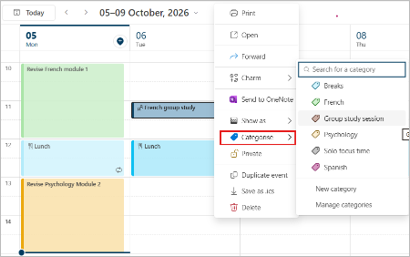
When planning your revision, try using Outlook custom categories to make different subjects or types of entry stand out. Each category has a different colour. As well as making your calendar clearer, you can filter calendar events by category to simplify searching.
Use categories in Outlook | Microsoft Support
Use calendar categories and reminders in Outlook | Microsoft Support
Outlook calendar categories video
Task management
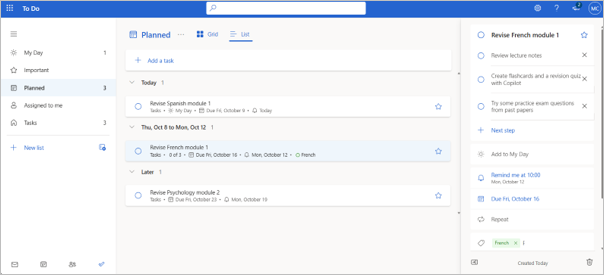
Use a task management app such as Microsoft To Do to plan your revision tasks. Set deadlines and reminders. Break your tasks into smaller steps to make them feel more manageable and get the satisfaction of ticking things off. The My Day list helps you focus on current priorities.
Finding files faster
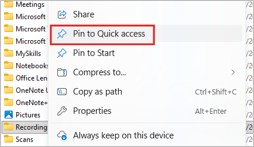
Use Pin to Quick access in File Explorer to help you access your favourite folders faster. Right click to get the option to pin or unpin a folder.
In Teams or SharePoint, right click on the folder and select Add shortcut to OneDrive.
Pin And Unpin Files And Folders To Quick Access Windows 11 Add shortcuts to shared folders in OneDrive | Microsoft Support
Distraction management - help to stay focused
Focus in Windows and Mac
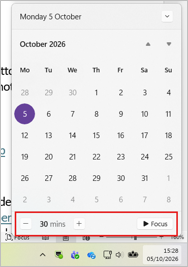
Windows: When you need time to concentrate, click the date/time at the bottom right of your screen and select Focus. Use Windows Notification settings to allow priority notifications.
Mac: Use the Control Centre to ‘turn on a Focus’ such as Do Not Disturb.
Focus: Stay on Task Without Distractions in Windows | Microsoft Support Turn a Focus on/off with Mac
Looking after your digital wellbeing
Set aside time in your schedule for screen free activities. Set yourself a reminder to make sure you don’t forget to take a break. Borrow fiction books and audiobooks via Aberdeen City Libraries. You can listen to audiobooks when walking or while doing your regular tasks around the house.