
Research is a step‑by‑step process that begins with understanding your question and planning you search. A good search strategy helps you find relevant, high‑quality sources efficiently, refine your ideas as you go and present your work with accuracy and integrity.
- 1. Understand the question
-
Before you start searching, try to work out exactly what the question is asking you to do.
- Clarify the task: What am I being asked? Are there limits such as time, place, population, specific theories?
- Use prior knowledge: Bring into your planning what you already know from lectures, reading, or previous discussions.
- Do some quick background reading: Use textbooks and reputable websites to familiarise yourself with key ideas and terminology or to clarify concepts.
- 2. Identify keywords and create a search plan
-
Turn your question into a set of searchable concepts.
- Pick out the main ideas in your question. For example, in: 'Compare and contrast selected aspects of rock art' main ideas could be rock art and techniques such as engraving, pictographs, geoglyphs. Or periods such as neolithic and bronze age. You may also want to introduce a location/region to the search. Or purposes of art rock such as ritual, spiritual or storytelling.
- Ignore phrases in your topic like analyse the or the impact of. The very fact that you are researching the topic necessitates analysis and comparison. Through presenting your findings you are describing the impact.
- Write down alternative terms and synonyms. For example, as a synonym for rock art you might use cave paint or rock painting.
- You don’t need a perfect plan before you start, but having a clear set of keywords and synonyms will make your searching more efficient.
The following document by the Student Learning Service explains what the research question is asking you to do. Understanding the Question: Command Terms
- 3. Boolean logic and search rules
-
Putting the theory into practice
Boolean logic
Boolean logic defines logical relationships between terms in a search. Main operators are AND, OR and NOT. You can use these operators to create a very broad or very narrow search.
- AND combines search terms so that search results contain all of the terms you have used. For example, "academic writing" AND undergraduate presents results that contain both terms.
- OR combines search terms so that results contain at least one of the terms. For example, undergraduate OR postgraduate finds results that contain either undergraduate or postgraduate.
- NOT excludes terms so that each search result does not contain any of the terms that follow it. For example, teaching NOT online finds results that contain teaching but not online. Use with care!
Notes:
- Boolean operators must be typed in upper case
- When executing a search, AND takes precedence over OR
Common search rules and techniques
Search rules help keep your searches precise and efficient by controlling how a search engine or database interprets your search terms.
- Truncation is used for retrieving multiple word endings: academ* looks for academic, academics, academia, academically
- Wildcard symbols: wom?n looks for women and woman | standardi?e looks for standardize and standardise
- Phrase searching forces two words to be looked at in this exact order, as opposed to finding the words separate in random places in the document: "academic writing" will retrieve results where writing appears after academic
- Subject headings can group items on the same topic together and help make your search more accurate than searching by keyword. They also help you navigate related concepts
Notes:
- Be conscious of variations in spelling conventions, for example UK versus US English
- OVID databases use controlled subject headings from each database's thesaurus. For example, MEDLINE uses Medical Subject Headings (MeSH) from the National Library of Medicine's controlled vocabulary
- You don't need a perfect plan before you start, but having a clear set of keywords and combinations will make your searching more efficient
A search strategy for 'Compare and contrast selected aspects of rock art' can look like this:
"rock art" OR "rock painting" AND "First Nations" OR Australia AND spiritual OR storytelling Mind maps
If it helps you identify clusters of related keywords or spot useful synonyms, try creating a mind map. The branches show you which terms belong together (your OR groups) and which ideas you need to combine (your AND groups).
Find out more about mind maps in section Memory Tricks and Mind maps under Approaches to Study and Time Management, a resource created by the Student Learning Service and available on Achieve and Achieve+.
- 4. Search in relevant databases and review your results
-
Choose tools that are appropriate for your subject. These will go beyond Primo and include specialist databases in your field.
- Different databases index different papers so it's worthwhile to search multiple databases.
- Start with broader searches, ie one or two concepts at a time, then narrow down using filters (for example, date, subject, peer‑reviewed).
- Scan titles and abstracts to see whether the results match your topic.
- Adjust as you go: add additional concepts beyond the first ones you used or add new keywords you discover along the way. Treat this as an exploratory stage. You are learning about the literature as you search. Some databases have ‘Indexed keywords’ or ‘Author keywords’ sections. Explore these to discover additional terms you can use in your search.
- Move to a different database if you need additional sources or the one you are using is not giving you many relevant results.
How to access databases through Primo
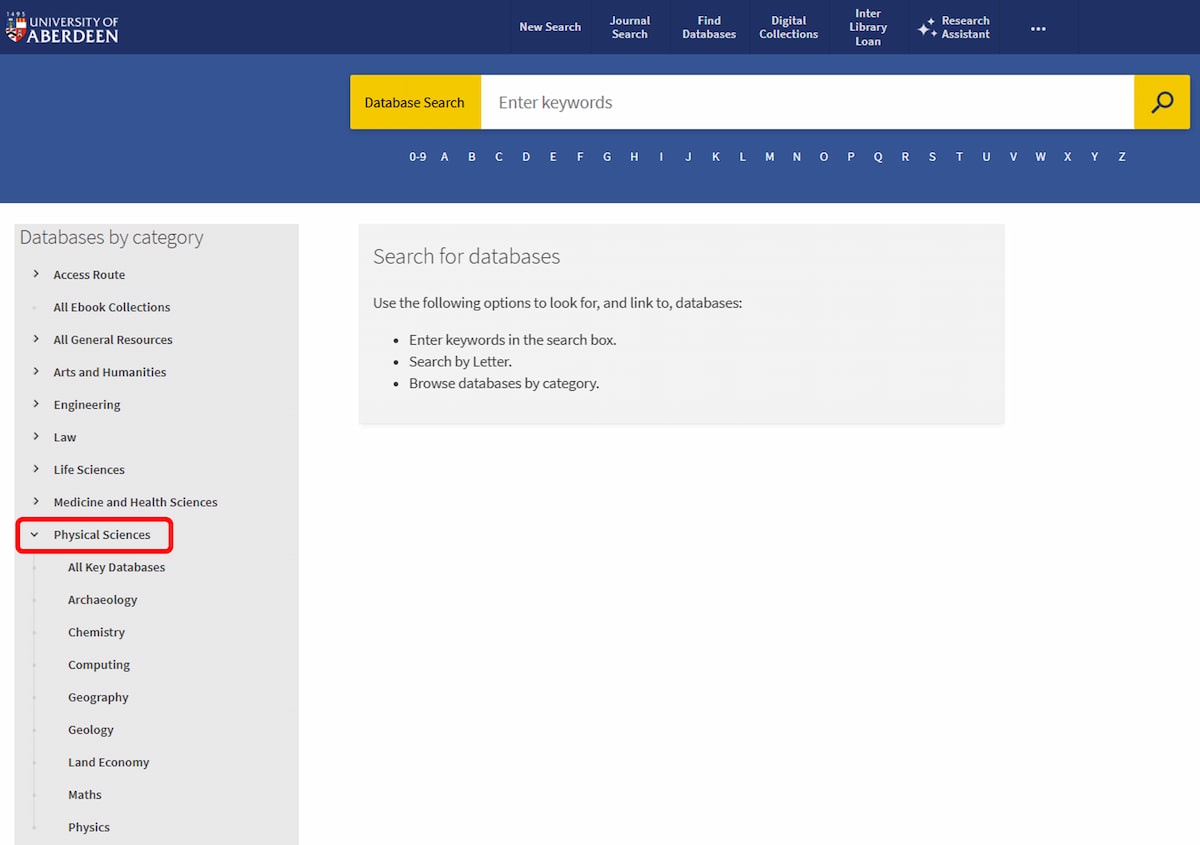
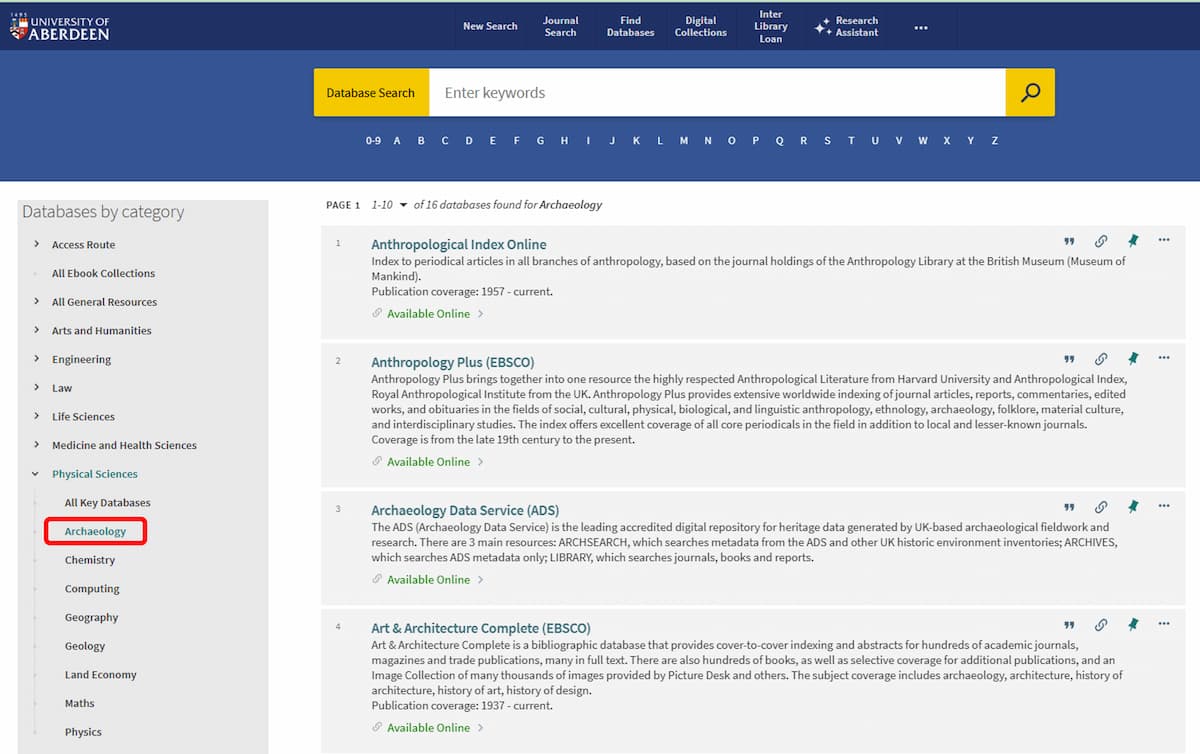
Explore academic databases in your subject through the Find Databases option in Primo. This is particularly important at Level 3, where you will be expected to go beyond your reading list and engage with the primary literature in your field. For example, for academic databases in Archaeology:
Click on Physical Sciences to expand the list of relevant disciplines
Select Archaeology from the list. You have access to 16 databases in Archaeology. You can click on the name of a database you already know or have used, or browse the list, as shown below, to discover others.
- 5. Evaluate what you find and refine your search
-
Not everything you find will be suitable for your assignment.
- Assess quality and relevance: Who wrote it? Is it scholarly? Is it up to date? Does it directly address your question?
- Check methodology and evidence: Are the research methods used appropriate? Are the conclusions supported?
- Refine your search if needed: If results are too broad or too few, go back and adjust your keywords, combinations and filters.
Evaluation and searching feed into each other; you may repeat this cycle several times.
Check this resource from the Student Learning Service to find out more about reading the literature critically and evaluating your findings. (You may be asked to sign in.)
- 6. Present your findings
-
Once you have selected your sources, you need to use them effectively in your work.
- Integrate evidence: Aim to summarise, compare and critique your sources rather than listing them. Your work should demonstrate your own understanding, analysis and research skills and the mark awarded will reflect your individual contribution to the academic discussion.
- Acknowledge your sources: Use the appropriate referencing style consistently. Always give credit for ideas that are not yours. Avoid plagiarism and follow ethical guidelines for using information.
Notes:
- See our Library Guides section on Referencing and Avoiding Plagiarism.
- The quality of your research will be reflected in the structure and depth of your final work.
- Throughout the process: Remember to manage your results using a reference management software and to practise academic integrity.
What to take away from this guide
- Information literacy is not only about finding sources; it is also about critically analysing, synthesising and handling information responsibly.
- Manage your references: Use reference management software such as RefWorks, EndNote or Zotero to store and organise your references, and create in-text citations and lists of references.
- Keep good notes: Record where you searched, which keywords you used and which filters you applied.
- Always check with the course coordinator the permitted levels of GenAI for your assignments. This will be indicated in the description of the assessment.
Check the Student Learning Service Achieve and Achieve+ resources for additional guidance on the use of Generative Artificial Intelligence tools in education. Find out more on the Academic Skills: Student Learning Service page.
Eleni Borompoka, April 2026